

Download Easy Capture and Thumbnail – Free Screen Capture Tool for Windows, Mac, and Mobile
Easy Capture & Thumbnail is a lightweight, professional screen capture tool designed for web designers, artists, and content creators who need fast, accurate, and hassle-free screenshot solutions. With its intuitive interface and powerful yet simple features, this software delivers a seamless experience across Windows, Mac, and mobile platforms. Whether you're capturing full screens, specific windows, or custom regions, Easy Capture & Thumbnail ensures high-quality output with minimal effort.
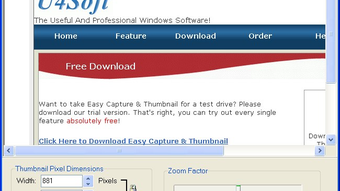
The tool runs quietly in the system tray, supports customizable hotkeys, and includes visual and audio feedback for every capture. You can adjust thumbnail zoom, set precise dimensions with the inching switch, and export images in JPEG or Windows bitmap formats—ideal for web and design workflows. Best of all, it’s free to download and update regularly with new improvements.
Say goodbye to complicated software and hello to instant, professional-grade screen captures.
Effortless Screen Capture with Multiple Modes
One of the standout features of Easy Capture & Thumbnail is its support for three distinct capturing modes: fullscreen, window object, and region selection. This versatility makes it perfect for users across various creative fields. Designers can quickly capture an entire UI layout for client presentations, while artists can isolate specific elements from complex designs.
The region mode allows for pixel-perfect selections, ensuring only the relevant content is captured—ideal for tutorials, documentation, or social media posts. Unlike many screen capture tools that require multiple steps or complex menus, Easy Capture & Thumbnail simplifies the process with a single click. The software remains lightweight and responsive, even during prolonged use, ensuring it doesn’t slow down your system.
Each capture is processed instantly, with minimal lag, so you can maintain your creative flow. The tool also includes a built-in preview window, allowing you to review and crop images before saving. This feature is especially helpful when working with high-resolution screens or when precision is key.
Whether you're capturing a full browser window for a blog post or a small UI component for a prototype, the tool adapts effortlessly to your needs. With customizable hotkeys, you can assign specific keys for each mode, making the workflow even faster. The system tray integration ensures the app is always accessible without cluttering your desktop.
This combination of speed, flexibility, and ease of use makes Easy Capture & Thumbnail a must-have for professionals and casual users alike.
Customization and Professional Workflow Integration
Easy Capture & Thumbnail goes beyond basic screen capture by offering a suite of customization options that elevate its usability for professionals. The zoom factor slider allows you to adjust the size of thumbnails in real time, making it easy to preview your captures before saving. This is particularly useful when preparing images for portfolios, websites, or presentations where consistency in size and clarity matters.
The inching switch feature enables you to fine-tune thumbnail dimensions with precision—perfect for maintaining exact pixel measurements in design projects. You can also choose between JPEG and Windows bitmap formats, giving you control over file size and image quality. JPEG is ideal for web use due to its compression, while bitmap offers lossless quality for print or detailed editing.
The software supports sound alerts upon capture, which can be helpful for users who prefer auditory confirmation—especially during long sessions or when multitasking. Additionally, the ability to run in the system tray means the app stays out of your way while remaining instantly accessible with a simple click or hotkey. This is a game-changer for multitaskers who need to switch between applications frequently.
The interface is clean and minimal, with no distracting elements, so you can focus on your work. For developers and designers, this tool integrates smoothly into existing workflows without requiring additional training or setup time. It’s compatible with both high-DPI displays and multi-monitor setups, ensuring consistent performance regardless of your hardware configuration.
Regular updates are released to improve stability and add new features, keeping the software secure and up-to-date. With these advanced yet intuitive tools, Easy Capture & Thumbnail becomes more than just a screenshot app—it’s a productivity enhancer.
Compatibility, Installation, and Usage Made Simple
Downloading and installing Easy Capture & Thumbnail is a breeze, regardless of your operating system. The software is available for Windows, Mac, Android, and iOS, making it a truly cross-platform solution. For Windows users, the installation process takes less than a minute—just download the .exe file from the official site, run the installer, and follow the on-screen prompts.
The app doesn’t require admin rights or complex configurations, which is great for corporate or school environments. Once installed, it automatically starts in the system tray, ready for use. Mac users can download the .dmg file and drag the app into their Applications folder.
The macOS version supports both Intel and Apple Silicon chips, ensuring smooth performance on all modern Macs. For mobile users, the Android and iOS apps are available on their respective app stores. These mobile versions allow you to capture screens on your phone or tablet and transfer them seamlessly to your desktop.
The app is lightweight, consuming minimal RAM and CPU, so it won’t interfere with your other tasks. To use it, simply click the system tray icon or press your assigned hotkey (default is Ctrl+Shift+S). Choose your capture mode—full screen, window, or region—then click to capture.
You’ll hear a sound alert and see a visual confirmation. The captured image appears in a preview window where you can crop, resize, or adjust the zoom before saving. You can also set a default save location and file naming convention.
The software supports batch processing for multiple captures, which is useful for creating tutorials or documentation. With automatic updates, you’ll always have the latest version with improved security and performance. Whether you're a beginner or a pro, the intuitive design ensures you can start capturing instantly.
Pros and Cons at a Glance
- Pros:
- Free to download and use with no hidden fees
- Supports three capture modes: full screen, window, and region
- Runs in system tray for quick access
- Customizable hotkeys and sound alerts
- Zoom slider and inching switch for precise thumbnail control
- Exports to JPEG and Windows bitmap formats
- Lightweight with minimal system impact
- Available for Windows, Mac, Android, and iOS
- Cons:
- Limited to basic editing features (no advanced image editing)
- No built-in annotation or markup tools
- Mobile version lacks some desktop features
- Interface is minimal—may feel too basic for some users
- No cloud sync or sharing directly from the app
Frequently Asked Questions (FAQ)
Is Easy Capture & Thumbnail free to download?
Yes, Easy Capture & Thumbnail is completely free to download and use. There are no trial periods, subscription fees, or hidden costs. You can install it on multiple devices and update it regularly without any charge.
Which operating systems does it support?
Easy Capture & Thumbnail is compatible with Windows (7 and later), Mac (Intel and Apple Silicon), Android, and iOS. This ensures seamless use across desktop and mobile devices.
Can I customize the hotkeys for screen capture?
Yes, the software allows you to assign custom hotkeys for each capture mode—full screen, window, and region. This customization enhances workflow efficiency, especially for frequent users.
Does it support high-DPI and multi-monitor setups?
Yes, Easy Capture & Thumbnail is optimized for high-DPI displays and multi-monitor environments, ensuring accurate captures across all screen configurations.
Can I edit screenshots after capture?
The app includes basic preview and cropping tools, but advanced editing (like annotations or filters) is not available. For full editing, you’ll need to use a separate image editor.
Final Verdict: A Must-Have for Designers and Creators
Easy Capture & Thumbnail stands out as one of the most user-friendly and efficient screen capture tools available today. Its clean interface, multiple capture modes, and customization options make it ideal for web designers, artists, developers, and content creators. While it lacks advanced editing features, its core functionality is solid, fast, and reliable.
The fact that it’s free, secure, and regularly updated adds immense value. Whether you're working on a Windows PC, Mac, or mobile device, this tool delivers consistent performance. If you're tired of complex software with steep learning curves, Easy Capture & Thumbnail offers a refreshing alternative.
Download it now and experience effortless screen capture with professional results.
Download Easy Capture & Thumbnail today and simplify your workflow with a secure, free, and powerful screen capture tool for Windows, Mac, Android, and iOS.







